
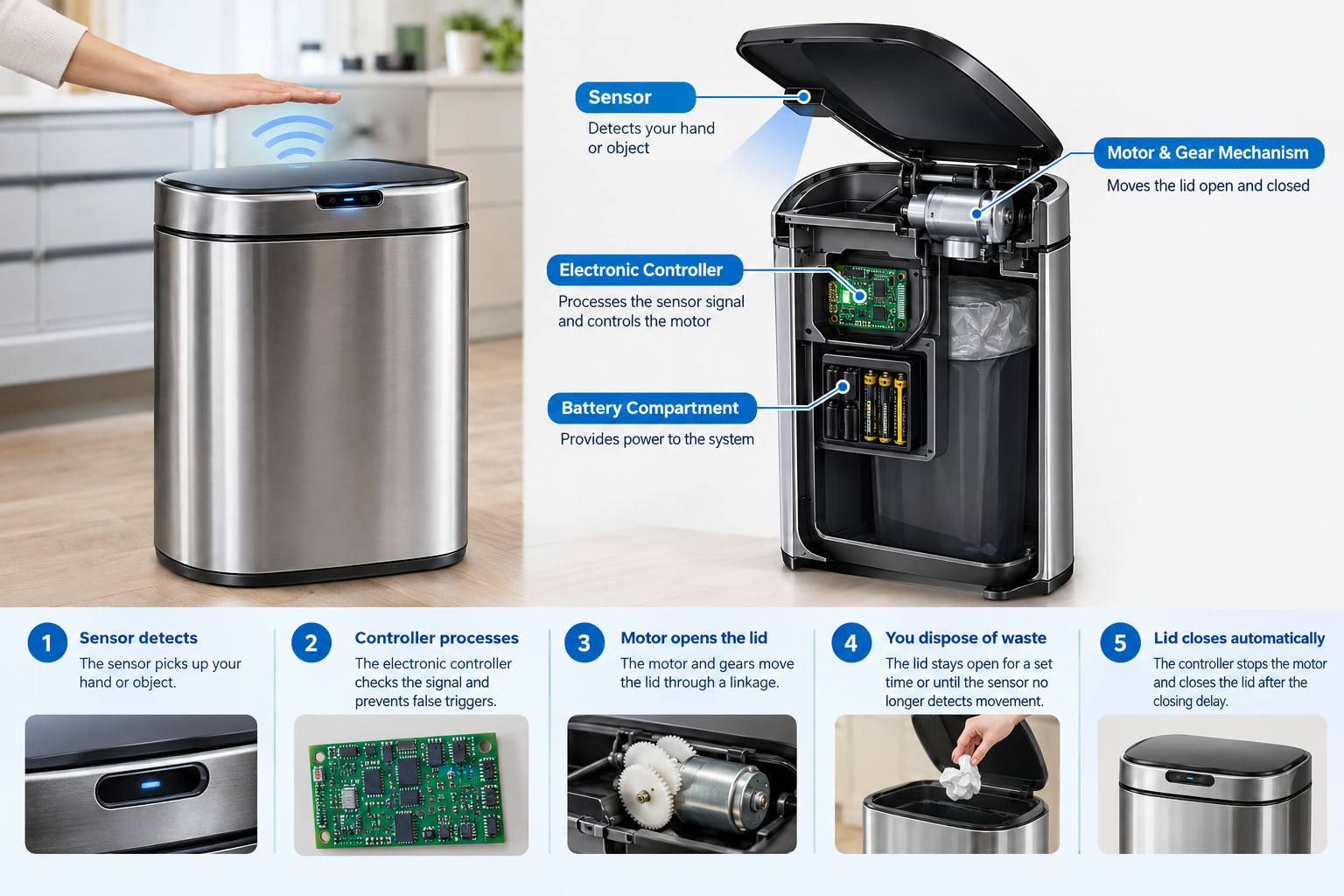
When you wave your hand over an automatic trash can and the lid opens, you may wonder what detects your movement and controls the lid. The good news is that the basic mechanism is straightforward once you understand how the sensor, electronic controller, motor, and closing timer work together.
Quick Answer: Smart trash cans use sensors and electronic controls to automate waste-disposal tasks. In a typical touchless model, a sensor detects a nearby hand or object, a controller activates a motor to open the lid, and a timer or detection logic triggers closing. The exact sensors, power source, and features vary by model.
Table of Contents
What You Need to Know
- Sensors detect nearby movement or objects: The sensor type determines how the trash can detects a hand or another trigger.
- A controller manages the lid: Electronic circuitry processes the sensor signal and activates the opening mechanism.
- A motor moves the lid: Gears or a linkage transfer the motor’s movement to the lid.
- Power and features vary: Many household models use batteries, while connected commercial bins may include additional monitoring technology.
- Troubleshooting starts with simple checks: Batteries, operating mode, sensor obstructions, and lid movement are useful first checks before seeking professional help.
How the Automatic Lid Works, Step by Step
A typical automatic trash can opens when its sensor detects a suitable trigger and its electronic controller activates the motor. The lid then remains open according to the model’s timing or detection logic before closing automatically.

Step 1: The sensor detects your hand.
The sensor monitors a detection zone near the lid. Depending on the design, the sensor may detect reflected infrared light, changes in infrared radiation, or another form of proximity or motion.

Step 2: The controller processes the signal.
An electronic controller determines whether the sensor signal should trigger the opening cycle. The control system helps prevent the lid from responding to every insignificant change in its surroundings.

Step 3: The motor opens the lid.
An electric motor produces rotational movement. Gears, a linkage, or another mechanical connection transfers that movement to the lid, allowing the lid to lift without you touching it.

Step 4: You dispose of the waste.
The lid stays open for a period determined by the model’s control logic. Some models use a timer, while others may use additional sensor input to manage the opening cycle.

Step 5: The lid closes automatically.
When the closing condition is met, the controller operates the mechanism to close the lid. The closing delay and response to continued movement depend on the particular model.
The key point: A sensor does not usually lift the lid directly. The sensor detects a trigger, the controller processes the signal, and the motor performs the physical movement.
How Do Smart Trash Cans Work? The Mechanism Explained
Smart trash cans combine detection, electronic control, mechanical movement, and a power source to automate specific functions. The four main parts of a typical touchless household bin are the sensor, controller, motor mechanism, and power supply.

The sensor and detection zone
A sensor is a component that detects a physical condition, such as proximity or movement, and produces a signal the control system can interpret.
The sensor sits near the lid or another suitable part of the bin. When a hand or object enters its detection zone, the sensor sends a signal to the controller.
The electronic controller
An electronic controller is a circuit that processes input signals and coordinates the device’s operation. In a touchless trash can, the controller determines when to activate the lid mechanism and how to manage the opening and closing cycle.
The controller’s programming and sensor arrangement differ among models, so not every trash can responds to movement in exactly the same way.
The motor, gears, and lid linkage
An electric motor converts electrical energy into mechanical movement. A gearbox or linkage can help transfer the motor’s movement to the lid in a controlled way.
Some models use different mechanical arrangements, so the exact motor, gears, and linkage should be verified from the manufacturer’s documentation.
The timer and automatic closing logic
The closing logic determines when the lid should return to its closed position. Depending on the model, the controller may use a preset delay, additional sensor readings, or other control rules.
A useful distinction: An automatic lid does not necessarily mean an internet-connected device. A trash can can operate its sensor and motor without Wi-Fi, a smartphone app, or cloud services.
What Types of Sensors Do Smart Trash Cans Use?
Smart trash cans can use different sensors depending on their design, price, and intended purpose. Infrared proximity sensing is one approach, but not every automatic trash can uses the same detection technology.
| Sensor or detection method | How it works | Practical consideration |
|---|---|---|
| Active infrared proximity | Emits infrared light and detects reflected light | Performance depends on sensor design, target, and surroundings |
| Passive infrared (PIR) | Detects changes in infrared radiation | Designed to detect changes in a scene rather than reflected light from its own emitter |
| Ultrasonic proximity | Uses sound waves and measures returning echoes | Can be affected by target shape, distance, and surroundings |
| Other electronic proximity sensors | Detect nearby objects using a different physical principle | Availability and response depend on the specific design |
A household trash can may use only one detection method or combine multiple inputs. Always check the manufacturer’s specifications before attributing a particular sensor to a product.
What can affect sensor accuracy?
Nearby movement, reflective surfaces, the position of the sensor, dirt on the sensor window, and the shape or distance of the target can influence detection. The exact effects depend on the technology used.
One counterintuitive point: a lid that opens unexpectedly does not automatically mean the sensor is defective. A nearby movement or an object inside the sensor’s detection zone may be enough to trigger some designs.
Do Smart Trash Cans Need Batteries, Wi-Fi, or an App?
Most basic touchless household bins need an electrical power source to run their sensors and motor, but they do not necessarily need an internet connection. Wi-Fi and smartphone controls are optional features on models designed to offer them.
Batteries and other power options
Battery-powered models use electricity from their installed batteries to operate the control circuit and lid mechanism. Some products use rechargeable batteries or another manufacturer-specified power arrangement.
Battery life varies with battery chemistry, capacity, opening frequency, motor load, and standby consumption. Without a specific model and its test conditions, a single battery-life estimate would be misleading.
When is connectivity useful?
A connected smart waste bin may provide additional functions such as remote monitoring, notifications, or waste-management reporting. Those capabilities are separate from the basic function of detecting a hand and opening a lid.
According to the U.S. Environmental Protection Agency, recycling involves collecting and processing materials so they can become new products; an automatic lid alone does not sort waste or make an item recyclable. Check your local recycling rules and use the correct bin for each material. Read the EPA’s recycling guidance.
US EPA
What affects battery life?
- How frequently the lid opens and closes.
- The energy required by the motor.
- The sensor and controller’s standby power consumption.
- Battery capacity, condition, and suitability for the device.
- Environmental conditions and the manufacturer’s recommendations.
When replacing batteries, follow the product manual. For disposal, the U.S. Department of Energy’s Consumer Guide to Battery Recycling explains why batteries should be handled and recycled appropriately.
The Department of Energy’s Energy.gov
Smart Trash Can Troubleshooting: Common Problems and Safe Checks
A touchless lid that suddenly stops responding or repeatedly opens can be frustrating. Start with simple, non-invasive checks before assuming the motor or sensor has failed.
The safest first step is to check the power source, operating mode, visible sensor area, and lid for obstructions. The correct fix depends on the model and the symptoms.
Smart Trash Can Mechanism & Troubleshooting Reference
Use this table to identify plausible causes and choose a safe first check.
| Symptom | Possible cause | Safe first check |
| Lid does not open | Weak batteries, disabled mode, blocked sensor, or mechanical problem | Check the power source, switch, and visible sensor window |
| Lid opens by itself | Movement in the detection zone, reflections, or sensitivity settings | Clear nearby objects and clean the sensor window according to the manual |
| Lid moves slowly | Low power or mechanical resistance | Check batteries and look for visible obstructions |
| Lid will not close | Continued detection, an obstructed lid, or a control fault | Move away from the sensor and inspect the lid area |
| Device stays unresponsive | Power failure, electronic fault, or damaged components | Follow the manufacturer’s reset and support instructions |
Save or screenshot this Smart Trash Can Mechanism & Troubleshooting Reference — it covers common lid problems, possible causes, and safe first checks.
Why does my automatic trash can keep opening?
An automatic trash can may repeatedly open if something remains within its detection zone or if its sensor responds to nearby movement. The cause can also be related to sensor placement, sensitivity settings, or a fault.
Move objects away from the lid, clean the sensor window as directed by the manufacturer, and test the bin in a less crowded location. If the problem continues, consult the manual or contact the manufacturer rather than disabling the sensor’s safety features.
Why will my touchless trash can not open or close?
A lid that does not respond may have weak batteries, an inactive operating mode, a blocked sensor, or a mechanical problem. A lid that cannot close may be obstructed or may continue receiving a trigger signal.
Check the power source and visible obstructions first. If the manufacturer’s reset procedure does not resolve the issue, or if you notice damaged wiring, unusual heat, or leaking batteries, stop using the device and seek appropriate support. Never force the lid or dismantle powered electronics.
When should you contact the manufacturer?
Contact the manufacturer if basic checks fail, the motor makes unusual noises, the lid jams repeatedly, or the device shows signs of electrical damage. Product-specific support is especially important when the unit contains a rechargeable battery that is not designed for user replacement.
What Are the Benefits and Limitations of Smart Trash Cans?
Smart trash cans can make waste disposal more convenient by reducing the need to touch a lid, but they also introduce powered components that need maintenance. Their actual benefits depend on the model and how it is used.
Hands-free convenience
A sensor-activated lid can be useful when your hands are occupied with food scraps or other waste. It can also reduce direct contact with the lid surface.
However, touchless operation does not make the entire bin sterile. The rim, body, handles, and surrounding surfaces can still become contaminated and require ordinary cleaning.
Maintenance and operating costs
Battery replacement, cleaning, and occasional sensor or motor issues are potential maintenance considerations. A more complex connected model may also require an app or network connection for certain optional features.
Before buying, check the power requirements, replacement-part availability, warranty, lid-opening controls, and whether the bin offers a manual opening option.
What automatic lids do not guarantee
An automatic lid does not necessarily eliminate odors, sort recyclables, compress waste, or notify you when the bin is full. Those functions require specific design features.
Choose based on the function you need, not just the word “smart” on the product label.
Which Type of Smart Trash Can Should You Choose?
The best type depends on whether you want simple hands-free operation, specialized sealing functions, or connected waste-management capabilities. A basic sensor-activated bin is different from a commercial system designed to monitor waste collection.
For a household, compare sensor responsiveness, capacity, lid clearance, power requirements, cleaning needs, and warranty. For a commercial environment, also investigate monitoring, capacity management, and collection-system compatibility where relevant.
Explore the existing Types of Smart Trash Cans article to compare designs and understand which features suit different situations.
The single commercial bridge: equipment for the job
If you are comparing products after learning how the mechanism works, use a manufacturer’s specification sheet or user manual as your evaluation tool. It can help you verify the sensor type, battery requirements, lid controls, and maintenance instructions before making a decision.
This is a research step, not an endorsement of any particular brand. No specific product was supplied for this article, so there is no product recommendation or affiliate link.
A Simple Smart Trash Can Buying Checklist
Before choosing an automatic bin, check the features that will matter in everyday use.
- The bin fits the space where you plan to place it.
- The sensor responds appropriately for your intended use.
- The lid has enough clearance to open without hitting a counter.
- The power source and replacement batteries are suitable and accessible.
- The lid can be operated or reset according to the manufacturer’s instructions.
- The interior and sensor area are practical to clean.
- The warranty and support options are clearly stated.
- Any advertised Wi-Fi, app, sealing, or fullness-monitoring feature is actually included.
If SmartTrashHub later offers an email newsletter, this is a natural place to invite readers to receive a printable smart trash can buying and maintenance checklist. The signup should be optional and should accurately describe the material subscribers will receive.
Frequently Asked Questions
1. How does a sensor trash can work?
A sensor trash can detects a nearby hand or object and sends a signal to its electronic controller. The controller activates a motor that opens the lid. After the opening cycle, a timer or other control logic determines when the lid closes. The precise detection method and timing depend on the model, so consult the manufacturer’s specifications for exact operating details.
2. How does an automatic trash can open?
An automatic trash can opens when its sensor detects a suitable trigger and its control circuit activates the lid motor. The motor moves the lid through a mechanical linkage or gear system. Most basic household models do not need Wi-Fi to perform this function. Sensor type, detection distance, and opening behavior vary by design.
3. How do touchless trash cans work without being touched?
Touchless trash cans use electronic sensors to detect a hand or another object near the lid. The control circuit interprets the sensor signal and operates the lid mechanism. The user can dispose of waste without directly touching the lid, but the rest of the bin may still need regular cleaning to maintain hygiene.
4. What are smart bins?
Smart bins are waste containers equipped with technology that automates or monitors one or more functions. A household smart bin may open its lid using a proximity sensor, while a connected commercial bin may monitor fullness or support waste collection management. The term does not describe one universal technology, and not every smart bin has internet connectivity.
5. Does a smart trash can need Wi-Fi?
No. A basic sensor-activated household trash can can detect movement and operate its lid without Wi-Fi. Some advanced models use wireless connectivity for optional features such as remote monitoring or notifications. Check the product specifications to determine whether an internet connection or smartphone app is required for any advertised feature.
6. Why does my automatic trash can keep opening by itself?
Repeated unexpected opening can result from movement near the sensor, nearby objects, reflections, sensor sensitivity, or a malfunction. Clear the detection zone, clean the sensor window according to the manufacturer’s instructions, and test the bin in a different position. If the problem continues, consult the manual or contact the manufacturer for model-specific troubleshooting.
7. How long do smart trash can batteries last?
Battery life depends on battery capacity and chemistry, opening frequency, motor energy requirements, standby consumption, and environmental conditions. There is no single reliable lifespan for all smart trash cans. Check the manufacturer’s stated battery life and testing conditions, use the recommended battery type, and replace or recharge batteries as instructed.
8. Are smart trash cans worth it?
A smart trash can may be worth the cost if hands-free operation makes everyday waste disposal more convenient. Before buying, compare sensor responsiveness, capacity, power requirements, cleaning needs, warranty, and replacement-part availability. A traditional bin may be more suitable if you prefer a simple, unpowered design. The best choice depends on your budget and how you plan to use it.
What to Do Next
Now that you understand the mechanism, follow these next steps to make a better-informed choice.
- Compare available designs: Read Types of Smart Trash Cans to explore different household and specialized bin types.
- Check the technical details: Before buying, review the specific model’s manufacturer documentation for sensor technology, power requirements, and maintenance instructions.
- Plan your next article: [CONTENT GAP: Smart Trash Can Buying Guide] — a future SmartTrashHub article could compare capacity, sensors, power options, and maintenance costs to help readers choose a suitable product.
The main takeaway is simple: a touchless trash can uses a sensor to detect a trigger, electronic controls to manage the opening cycle, and a motor mechanism to move the lid. Understanding those components makes it easier to compare models and identify common operating problems without assuming every smart bin works the same way.
Pingback: Smart Trash Can Components: 7 Key Parts