
SmartTrashHub.com | Troubleshooting & Repairs | United States
Your automatic trash can lid is stuck open, refuses to close, or stops halfway through its movement, leaving you unable to use it normally. The good news is that several common problems can be checked without replacing the entire trash can.
Quick Answer: A smart trash can lid stuck in the open or closed position may have a blocked hinge, weak batteries, sensor interference, or a mechanical problem. Start by removing obstructions, checking the batteries, cleaning the sensor area, and inspecting the lid mechanism. Follow your manufacturer’s reset instructions before considering replacement.
Table of Contents
What You Need to Know
- Physical obstructions around the lid and hinges can prevent normal movement.
- Weak batteries may cause slow, inconsistent, or failed lid operation.
- Dirty infrared sensors can interfere with automatic opening and closing.
- Grinding noises or repeated jamming may indicate a mechanical problem.
- Reset procedures and replacement parts vary by trash can manufacturer and model.
What to Do When Your Smart Trash Can Lid Is Stuck
A stuck automatic trash can lid does not automatically mean the motor has failed. Start with simple external checks before considering mechanical repairs.
The safest troubleshooting approach is to check the power supply, sensor area, lid clearance, and manufacturer’s reset instructions in that order.
Before starting, place the trash can on a stable surface and keep your fingers away from moving hinges.
Why Is Your Automatic Trash Can Lid Stuck?
An automatic trash can lid can become stuck because of physical interference, weak batteries, sensor problems, misalignment, or a malfunctioning motor.
Identifying the likely cause first helps you avoid unnecessary repairs.
Physical Obstructions Around the Lid
A small object trapped near the hinge can prevent the lid from completing its movement.
Check for:
- Trash bag edges caught between the lid and rim.
- Food packaging trapped near the hinge.
- Debris around the moving mechanism.
- Objects touching the lid as it opens.
Remove visible obstructions without forcing the lid.
Weak or Incorrectly Installed Batteries
Battery-powered automatic trash cans depend on a suitable power supply to operate their sensors and motors.
Low batteries may cause:
- Slow lid movement.
- Intermittent sensor responses.
- Incomplete opening or closing.
- Failure to respond to hand movements.
Check the battery type and polarity against the manufacturer’s instructions.
Dirty or Blocked Infrared Sensors
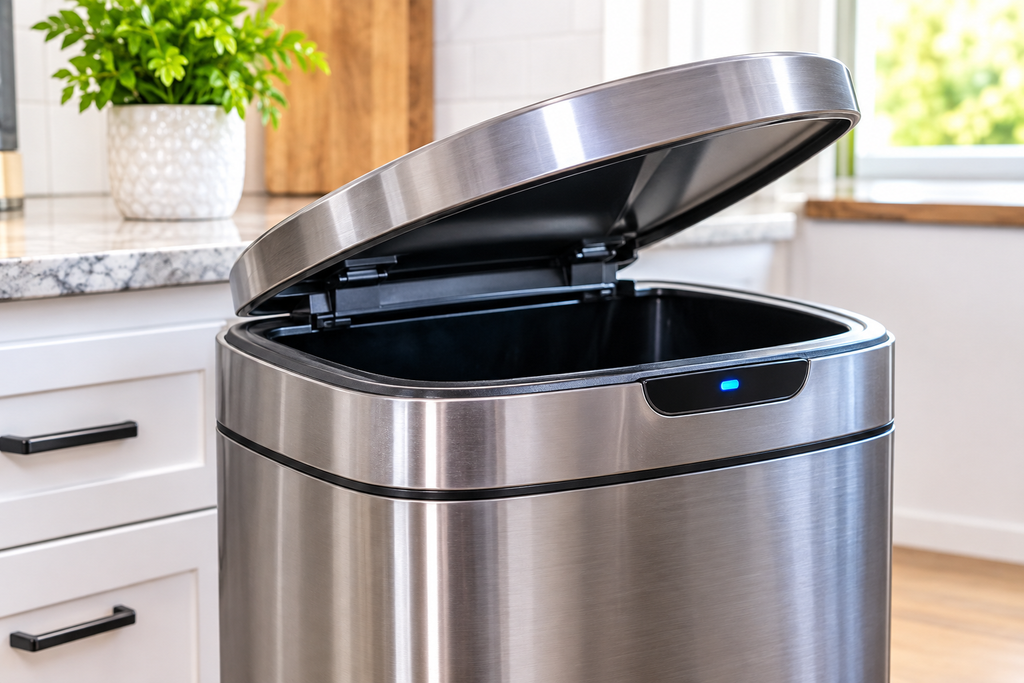
An infrared sensor is an electronic component that detects nearby objects using infrared light, allowing the trash can to open automatically.
Dust, fingerprints, grease, or other contamination around the sensor window may interfere with detection.
Clean the external sensor window gently using a soft, dry cloth, following the manufacturer’s cleaning instructions.
Misaligned Hinges or Lid Mechanism
A lid that sits unevenly may rub against the trash can rim or encounter resistance during movement.
Look for visible gaps, uneven positioning, or debris around the hinge.
Do not bend the hinge or attempt to realign internal components without model-specific instructions.
Motor or Electronic Control Problems
The motor moves the automatic lid, while the electronic control system manages its operation.
A damaged motor, loose internal connection, or control-board problem may cause repeated movement failures.
A grinding noise combined with repeated jamming is a reason to stop operating the automatic mechanism rather than repeatedly triggering it.
How Can You Fix a Smart Trash Can Lid Stuck Open?
If your automatic lid is stuck, work through these seven troubleshooting steps before deciding that the trash can needs replacement.
Start with external checks and move toward more complicated troubleshooting only when necessary.
1. Remove Objects Blocking the Lid
Action: Inspect the entire lid opening and hinge area for obstructions.
- Remove trash bags that are caught between the lid and rim.
- Check for packaging or debris near the hinges.
- Make sure the lid has enough clearance to move.
- Remove visible obstructions carefully.
Never pull a jammed lid forcefully. Excessive pressure can damage plastic hinges or connected moving parts.
2. Check and Replace the Batteries
Action: Inspect the battery compartment and install the correct batteries if necessary.
Follow these steps:
- Turn off the automatic trash can using its power switch, if available.
- Open the battery compartment according to the manufacturer’s instructions.
- Check for incorrectly positioned or depleted batteries.
- Inspect the battery contacts for visible corrosion.
- Install the manufacturer-recommended battery type, matching the positive and negative markings.
- Close the compartment and turn the unit back on.
Test the lid using the normal sensor operation.
Do not mix old and new batteries or different battery types. If you notice leakage or corrosion, follow appropriate battery safety instructions rather than handling damaged batteries carelessly.
3. Clean the Infrared Sensor Area
Action: Gently clean the external sensor window.
A dirty sensor can interfere with the automatic opening response.
- Switch off the trash can.
- Locate the external sensor window.
- Use a clean, soft, dry cloth to remove dust and fingerprints.
- Check for stickers or objects covering the sensor.
- Restore power and test the sensor.
Avoid spraying cleaning liquid directly onto the sensor. Moisture entering the electronic housing may cause additional problems.
4. Inspect the Lid and Hinge Mechanism
Action: Look for visible damage or interference around the moving parts.
Check:
- Whether the lid sits evenly on the trash can.
- Whether the hinge area contains trapped debris.
- Whether any plastic parts appear cracked.
- Whether the lid rubs against the container rim.
If the lid is visibly damaged, do not repeatedly activate the motor.
Some automatic trash cans have enclosed hinge assemblies that should only be opened according to manufacturer instructions.
5. Check for Lid Alignment Problems
Action: Compare the lid’s position with the trash can rim.
A misaligned lid may create resistance that prevents complete movement.
Look for:
- One side sitting higher than the other.
- Uneven gaps around the lid.
- A lid that touches the container body.
- Visible damage around the hinge attachment.
If the manufacturer provides an alignment procedure, follow it carefully. Do not bend the lid or force the hinge into position.
6. Reset the Automatic Trash Can
Action: Follow the reset procedure provided for your exact model.
A reset may help when an electronic control system stops responding normally.
A general troubleshooting approach is:
- Switch off the trash can.
- Disconnect its power source or remove batteries only if the manual permits it.
- Wait for the period specified by the manufacturer.
- Restore the power supply.
- Turn the unit on.
- Test the lid using its normal activation method.
Some models use a dedicated reset button, while others use a particular button sequence.
There is no universal reset procedure for every automatic trash can. Do not assume that removing batteries for a particular number of minutes will reset every model.
7. Contact the Manufacturer for Mechanical Problems
Action: Stop troubleshooting if the lid continues to jam or produces unusual mechanical sounds.
Contact the manufacturer if:
- The motor repeatedly makes grinding noises.
- The lid stops halfway during every operation.
- The hinge assembly appears damaged.
- The lid remains stuck after basic troubleshooting.
- The control system does not respond after the approved reset.
Provide the manufacturer with the model number, a description of the symptoms, and any relevant warranty information.
Avoid opening the motor housing or attempting electrical repairs without appropriate instructions and qualifications.
Smart Trash Can Lid Troubleshooting Chart
Different symptoms can point toward different problems. The following chart helps you identify the first safe check before attempting a repair.
| Symptom | Possible cause | First safe check |
|---|---|---|
| Lid stuck open | Obstruction or mechanism issue | Inspect hinge area |
| Lid won’t close | Sensor or mechanical issue | Check sensor area |
| Lid moves slowly | Weak batteries or resistance | Check batteries and clearance |
| Grinding noise | Possible mechanical interference | Stop automatic operation |
| Lid opens halfway | Obstruction or alignment issue | Check lid clearance |
| Lid does not respond | Battery or electronic issue | Check power supply |
These are possible causes, not confirmed diagnoses. The exact cause depends on the trash can’s design.
Save or screenshot this Smart Trash Can Lid Troubleshooting Chart — it covers common symptoms, possible causes, and the first safe checks to perform.
If you want to keep these checks handy, a printable maintenance checklist can also help you remember the battery, sensor, and hinge inspections.
[CONTENT GAP: A downloadable Smart Trash Can Maintenance Checklist and email signup form have not yet been created.]
Why Won’t My Automatic Trash Can Lid Close Automatically?
An automatic trash can lid may refuse to close because of sensor interference, physical resistance, low battery power, or a problem with its control system.
The first thing to determine is whether the lid moves freely or stops because something is interfering with its mechanism.
Lid Opens but Does Not Close
When the lid opens normally but remains open, check whether an object is obstructing its closing path.
Also inspect the sensor area. Some models use the sensor system to manage activation and closing behavior, so the exact operating sequence matters.
Consult the product manual to understand how long the lid should remain open and whether a separate closing control is available.
Lid Closes Halfway and Stops
A lid that repeatedly stops halfway may be encountering physical resistance or experiencing a mechanical or electronic fault.
Check the hinge area, lid alignment, and battery condition.
If the same problem continues after these checks, avoid repeatedly activating the motor. Manufacturer assistance may be necessary.
Lid Moves Slowly or Makes Noise
A slow-moving lid may indicate weak batteries, resistance around the hinge, or a motor problem.
A grinding sound deserves more attention than ordinary movement noise.
Do not assume that every unusual sound means the motor needs replacement. An obstruction or damaged moving component may produce similar symptoms.
Common Mistakes When Fixing a Stuck Automatic Trash Can Lid
Many troubleshooting attempts make the problem worse because the owner focuses on forcing the lid instead of identifying the reason it stopped moving.
Avoid these common mistakes:
Forcing the Lid Closed
Pushing a motorized lid down can place additional stress on the hinge and connected mechanism.
Use manual movement only when the manufacturer permits it.
Replacing the Motor Too Early
A slow or unresponsive lid does not automatically indicate motor failure.
Check the batteries, sensor window, and visible obstructions first.
Spraying Cleaning Products Into the Mechanism
Liquid cleaners can enter the electronic housing and damage sensitive components.
Clean external surfaces using manufacturer-approved methods.
Using the Wrong Batteries
Incorrect battery sizes, battery chemistry, or installation direction may cause unreliable operation.
Always follow the battery specifications in the manual.
Repeatedly Activating a Grinding Motor
Repeated operation can worsen an existing mechanical problem.
Stop using the automatic mechanism if grinding or repeated jamming occurs.
Following Another Model’s Reset Instructions
Different brands and models may use different reset methods.
A reset sequence from an unrelated trash can may not work and could cause confusion.
When Should You Repair or Replace a Smart Trash Can Lid?
Repair is worth considering when the problem involves a removable part, an accessible obstruction, or a manufacturer-supported replacement component. Replacement may make more sense when the mechanism is badly damaged or compatible parts are unavailable.
Before spending money, check these points:
- Warranty coverage: Contact the manufacturer before opening the unit or attempting internal repairs.
- Replacement part availability: Ask whether the manufacturer sells a compatible replacement lid or mechanism.
- Repair cost: Compare the estimated repair cost with the price of a replacement unit.
- Model compatibility: Confirm the exact model number before ordering any component.
- Condition of the trash can: Consider whether the container body and other electronic components remain functional.
If the lid itself is damaged but the rest of the trash can works, a manufacturer-approved compatible replacement lid may be the equipment needed for the repair.
[AFFILIATE LINK: Manufacturer-approved compatible automatic trash can replacement lid — add only after verifying the product and model compatibility.]
Do not purchase a replacement motor or lid based only on appearance. Two trash cans that look similar may use different electronic connections and hinge designs.
How Can You Prevent Smart Trash Can Lid Problems?
Regular external cleaning, correct battery installation, and keeping the hinge area clear can help reduce avoidable operating problems.
Preventive maintenance is easier than troubleshooting a lid after it becomes completely stuck.
Use these maintenance habits:
- Clean the external sensor window using the manufacturer’s recommended method.
- Keep the lid rim and hinge area free of debris.
- Replace batteries when the unit shows signs of reduced performance.
- Avoid overloading the trash can or trapping bags around the lid.
- Keep liquids away from electronic components.
- Follow the manufacturer’s instructions for storage and cleaning.
For battery disposal, follow the guidance provided by the U.S. Environmental Protection Agency’s household battery recycling guidance.
A useful distinction: replacing batteries may solve a power problem, but it will not repair a physically damaged hinge or broken motor.
Frequently Asked Questions About Smart Trash Can Lids
1. Why Is My Smart Trash Can Lid Stuck Open?
A smart trash can lid may remain open because of an obstruction, sensor interference, weak batteries, or a mechanical problem. First, inspect the lid opening and hinge area. Clean the external sensor window and check the power supply. If the lid remains open after these checks, consult the manufacturer’s instructions for your particular model.
2. Why Won’t My Automatic Trash Can Lid Close?
An automatic trash can lid may fail to close because something is blocking its movement, the sensor system is malfunctioning, or the mechanism has developed a fault. Check the lid clearance and battery condition first. If the lid opens normally but repeatedly refuses to close, follow the manufacturer’s troubleshooting instructions rather than forcing the lid down.
3. Can Low Batteries Cause a Trash Can Lid to Stop Working?
Yes. Low batteries can affect the operation of a battery-powered automatic trash can, including its sensor response and motor movement. Depending on the model, the lid may move slowly, respond inconsistently, or stop operating. Check the battery specifications and polarity, then install a complete set of suitable batteries as recommended by the manufacturer.
4. How Do I Reset an Automatic Trash Can?
The reset procedure depends on the trash can’s manufacturer and model. Some automatic trash cans have a dedicated reset button, while others require a manufacturer-specified power cycle or button sequence. Check the product manual before disconnecting batteries or power. After completing the approved reset, restore power and test the lid using its normal sensor controls.
5. How Do I Fix an iTouchless Trash Can Lid?
Start by checking the batteries, clearing obstructions, and gently cleaning the external sensor area of your iTouchless trash can. Check the model-specific instructions before attempting a reset. The correct procedure can differ between iTouchless products. If the lid remains stuck or the motor makes unusual noises, contact iTouchless support for model-specific repair or replacement guidance.
Official resource: iTouchless common trash can problems and solutions.
6. Can I Replace an Automatic Trash Can Lid?
Some automatic trash cans have manufacturer-supported replacement lids, while others require replacement of a larger assembly or the complete unit. Check your model number and contact the manufacturer to confirm part availability. Before purchasing, verify the hinge design, electronic connections, sensor arrangement, and compatibility. A lid that looks identical may not fit or operate correctly.
7. What Does a Grinding Noise From a Trash Can Lid Mean?
A grinding noise may indicate an obstruction, damaged hinge, misaligned moving component, or motor-related problem. The sound alone cannot identify the exact failure. Stop repeatedly activating the automatic mechanism, inspect accessible areas for visible interference, and contact the manufacturer if the noise continues. Avoid opening the motor housing without appropriate repair instructions.
8. Can I Manually Close a Stuck Automatic Trash Can Lid?
Whether you can manually close a stuck automatic trash can lid depends on its mechanism. Some models allow manual movement, while others have motorized or geared assemblies that can be damaged by force. Check the manufacturer’s instructions before attempting manual operation. If the lid resists movement, stop rather than pushing it into position.
9. How Do I Fix a Soft-Close Trash Can Lid?
A soft-close trash can usually uses a damping mechanism to slow the lid during closing. If the lid stops closing smoothly, inspect the hinge area for debris and visible damage. Do not apply oil or lubricant unless the manufacturer recommends it. A damaged damper may require a compatible replacement component rather than an adjustment to the automatic sensor.
10. Why Is My Automatic Trash Can Not Opening All the Way?
An automatic trash can that opens only halfway may have an obstruction, weak batteries, hinge resistance, or a mechanical fault. Check whether the lid or trash bag is rubbing against the container. Inspect the battery supply and visible hinge area. If the problem continues, consult the product manual because some models have specific opening limitations or adjustment procedures.
What to Do Next
A stuck automatic trash can lid does not always require an expensive replacement. Begin with the batteries, sensor window, visible obstructions, and manufacturer-approved reset procedure.
If your lid is still malfunctioning, these resources are useful next steps:
- Understand unexpected sensor activation: Read our existing article about why a smart trash can opens by itself.
- Learn about sensor failures: [CONTENT GAP: Automatic Trash Can Sensor Not Working — future article.]
- Compare repair and replacement options: [CONTENT GAP: Best Automatic Trash Cans / Replacement Smart Trash Can Guide — future commercial page.]
The goal is simple: identify the actual problem before spending money on a replacement.