
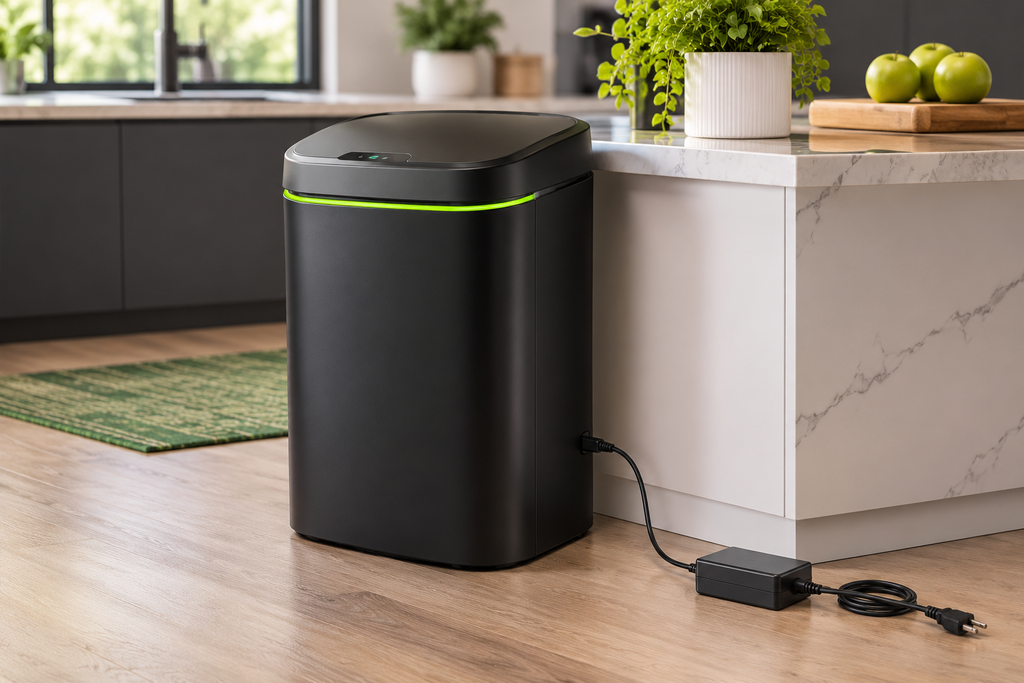
If your automatic trash can keeps draining batteries, you may be looking for a way to power it directly from a wall outlet. A smart trash can ac adapter can provide a convenient alternative, provided your particular model supports external power and the adapter matches its electrical requirements.
You do not need to guess which adapter will work. Checking a few specifications can help you avoid compatibility problems and potentially damaging your trash can’s electronics.
Quick Answer: Yes, some smart trash cans can use an AC adapter instead of batteries, but compatibility depends on the manufacturer’s specifications. Before connecting an adapter, check the required output voltage, current rating, connector size and polarity. Never assume that a universal adapter or USB-C charger will work simply because its plug fits.
Table of Contents
What You Need to Know
- Some automatic trash cans support both battery power and an optional AC adapter, while others operate only with batteries.
- The correct adapter must match the manufacturer’s voltage, current, polarity and connector requirements.
- USB-C charging is not a universal feature of sensor trash cans.
- Plug-in power can reduce battery replacement, but batteries offer greater flexibility when an electrical outlet is unavailable.
- Always check your trash can’s model number and official documentation before purchasing a replacement power supply.
What Is a Smart Trash Can AC Adapter?
An AC adapter is an electrical device that converts household alternating current (AC) into the direct current (DC) required by compatible electronic equipment. In an automatic trash can, the adapter supplies electricity to the electronic components that operate the lid and motion sensor.
Most sensor trash cans use a motor, control circuit and infrared or other motion-detection technology to operate automatically.
Depending on the design, these components receive electricity from batteries or an approved external power supply.
How Does an AC Adapter Power a Sensor Trash Can?
An AC adapter connects to a household electrical outlet and supplies the voltage and current specified by the trash can manufacturer.
The power connection typically works through these components:
- Wall outlet: Supplies household AC electricity.
- Power adapter: Converts AC electricity into the required DC output.
- Power connector: Transfers the electricity to the trash can.
- Electronic control system: Uses the supplied power to operate the sensor and lid mechanism.
Not every automatic trash can has an external power input. Some models are designed exclusively for battery operation.
An adapter only provides a suitable power source when the trash can was designed to accept that type of external connection.
AC Adapter vs. Battery Power
Both options can operate compatible automatic trash cans, but they offer different advantages.
Battery-powered models use replaceable batteries, while plug-in models receive electricity through an external power supply.
The best option depends on where you place your trash can and how often you want to replace batteries.
Can You Use an AC Adapter Instead of Batteries in a Smart Trash Can?
Yes, you can replace battery power with an AC adapter on certain sensor trash cans, but only when the manufacturer specifically supports external power. Some models include a dedicated adapter port, while others have no external power connection.
Before replacing batteries with an adapter, check your model’s user manual, power-input label or manufacturer support documentation.
Which Smart Trash Cans Support AC Power?
Smart trash cans are not all designed with the same electrical configuration.
Some models support an optional AC adapter, while other models rely entirely on replaceable batteries.
For example, certain iTouchless automatic trash can models are sold with manufacturer-specific AC adapters. However, compatibility should always be confirmed against the exact trash can model.
Do not assume that every iTouchless trash can or every automatic trash can supports the same adapter.
How to Check Your Manufacturer’s Power Requirements
Follow these steps before purchasing an adapter:
- Find the model number. Look for the product label on the trash can, battery compartment or manufacturer’s documentation.
- Check the user manual. Search for terms such as AC adapter, DC input, external power or optional power supply.
- Inspect the power connection. Determine whether the trash can actually has a designated external power port.
- Read the electrical specifications. Record the required voltage, current, polarity and connector dimensions.
- Confirm compatibility with the manufacturer. If the specifications are unclear, contact customer support before connecting a replacement adapter.
A particularly useful detail: two adapters can have identical-looking plugs but different electrical specifications. Physical fit alone does not establish compatibility.
How Do You Choose a Smart Trash Can AC Adapter? 7 Compatibility Checks
Choosing a replacement adapter requires more than matching the connector. You must verify the electrical specifications and confirm that the manufacturer approves the power supply for your model.
Use the following seven checks before purchasing an adapter.
1. Check the Required Output Voltage
Voltage measures the electrical potential supplied by an adapter. It is usually expressed in volts (V).
Look for the required DC input voltage on the trash can’s product label or user manual.
For example, if a device specifies 6V DC input, a different output voltage should not be substituted unless the manufacturer explicitly permits it.
An incorrect voltage can prevent proper operation or damage electronic components.
2. Check the Current Rating
Current measures the amount of electrical current supplied to a device. It is expressed in amperes (A) or milliamperes (mA).
The replacement adapter must provide at least the current capacity required by the trash can, while following the manufacturer’s specifications.
For example, 500 mA equals 0.5 A.
A compatible adapter with a higher available current rating does not automatically force that entire current into the device. The device draws the current it requires, provided the power supply is suitable and correctly specified.
3. Understand Connector Polarity
Polarity identifies the positive and negative electrical connections of a DC power connector.
Many barrel connectors use center-positive or center-negative configurations.
The correct polarity must match the manufacturer’s requirements.
Using an adapter with reversed polarity can damage the trash can’s internal electronics.
4. Verify the Connector Size
The connector must match the trash can’s designated power input.
Check:
- Outer connector diameter.
- Inner connector diameter.
- Connector length.
- Connector style.
- Manufacturer-specified plug dimensions.
A plug that enters the socket does not necessarily make a secure or electrically compatible connection.
5. Confirm Manufacturer Compatibility
Look for an adapter recommended or approved for the exact trash can model.
A manufacturer-approved replacement is generally a more reliable starting point than an unidentified universal power supply.
Check the official product documentation and replacement-parts information before ordering.
6. Check Electrical Safety Certification
Electrical safety certification provides additional information about how a product has been evaluated.
Look for an applicable certification mark and verify the product’s certification information where possible.
According to UL Solutions’ explanation of UL safety marks, UL marks identify products evaluated under applicable certification programs.
Remember that certification does not automatically establish compatibility with your particular trash can. The electrical specifications must still match.
7. Check the Manufacturer’s Power Requirements
Before connecting the adapter, compare its label with the trash can’s documented input requirements.
Check the following:
- DC output voltage.
- Current capacity.
- Connector dimensions.
- Polarity.
- Manufacturer compatibility.
- Electrical safety information.
If any essential specification is missing or unclear, do not guess.
Smart Trash Can AC Adapter Compatibility Reference Chart
Use this reference chart to check the essential details before purchasing a replacement power supply.
| What to check | What you should verify | Why it matters |
|---|---|---|
| Manufacturer | Brand and exact model | Determines compatibility |
| Output voltage | Required DC voltage | Prevents incorrect voltage supply |
| Current rating | Required current capacity | Ensures adequate power delivery |
| Polarity | Positive and negative configuration | Prevents reversed connections |
| Connector size | Inner and outer dimensions | Ensures a suitable physical connection |
| USB-C support | Explicit manufacturer approval | Prevents unsupported charging |
| Safety certification | Applicable certification mark | Helps assess electrical safety |
Save or screenshot this Smart Trash Can AC Adapter Compatibility Reference Chart — it covers the essential checks needed before selecting a replacement adapter.
Plug In vs Battery Trash Can: Which Is Better?
A plug-in automatic trash can receives electricity from an external power adapter, while a battery-powered model operates using replaceable batteries.
Neither option is automatically better. Your choice depends on outlet availability, placement, convenience and the manufacturer’s supported power options.
| Feature | Plug-in trash can | Battery-powered trash can |
|---|---|---|
| Power source | Wall outlet and adapter | Replaceable batteries |
| Battery replacement | Usually unnecessary during supported plug-in operation | Required when batteries run low |
| Placement | Needs a suitable outlet | More flexible placement |
| Power interruptions | Depends on electrical supply | Can continue operating with charged batteries |
| Initial setup | Requires compatible adapter and outlet | Requires suitable batteries |
| Maintenance | Adapter and cable inspection | Battery replacement |
| Portability | Limited by cable and outlet | Generally easier to relocate |
Advantages of Plug-In Trash Cans
A compatible plug-in configuration can reduce the need to purchase replacement batteries.
Other advantages include:
- Continuous external power while electricity is available.
- Less frequent battery replacement.
- Convenient operation near a suitable outlet.
- Reduced battery-related maintenance.
However, a plug-in trash can still depends on its power adapter and electrical supply.
Advantages of Battery-Powered Trash Cans
Battery-powered models offer flexibility because they do not need to remain near an electrical outlet.
Benefits include:
- Easier placement around the kitchen.
- No external power cable.
- Convenient relocation.
- Continued operation during a household power interruption, provided the batteries have sufficient charge.
Battery performance depends on the battery type, sensor activity, motor usage and trash can design.
For more information about battery performance, read our article on how long smart trash can batteries last.
Which Option Makes More Sense for Your Kitchen?
Choose a plug-in model if your trash can supports external power and you have a convenient electrical outlet nearby.
Choose a battery-powered model if you prefer flexible placement or do not want a power cable running across your kitchen.
One detail many buyers overlook: a battery-powered trash can with an optional AC adapter may offer both arrangements. However, you should verify whether the model supports both power sources and how the manufacturer instructs users to switch between them.
Can You Use USB-C Charging With a Smart Trash Can?
USB-C charging works only when the trash can includes a compatible USB-C power input and its manufacturer specifies the required charging or power arrangement.
The presence of a USB-C-shaped connector alone does not prove that a trash can supports USB-C charging.
Does USB-C Work With Every Sensor Trash Can?
No. Many automatic trash cans use battery compartments or dedicated DC power connectors instead of USB-C.
Some newer electronic products use USB-C, but that does not make the technology universal across smart trash cans.
Check the product manual for:
- USB-C input support.
- Required input voltage.
- Supported current.
- Charging or power requirements.
- Approved cable and power source.
USB-C vs. Manufacturer-Specific Power Adapters
| Feature | USB-C power | Manufacturer-specific adapter |
|---|---|---|
| Connector | Standardized USB-C connector | Model-dependent connector |
| Compatibility | Requires supported USB-C input | Requires matching model specifications |
| Power requirements | Must follow device specifications | Must follow device specifications |
| Replacement options | Depends on supported USB-C power requirements | Often available through the manufacturer |
| Universal compatibility | No | No |
USB-C is a connector standard, not a guarantee that every connected device will accept the same power supply.
How to Choose the Right Replacement Power Adapter
The safest way to choose a replacement adapter is to start with your trash can’s original power specifications rather than searching by appearance alone.
If you have lost the original adapter, the manufacturer’s documentation or customer support can help identify the correct replacement.
Where to Find Your Trash Can’s Power Specifications
Check these locations:
- The original adapter label, if available.
- The trash can’s electrical information label.
- The product user manual.
- The manufacturer’s official website.
- The manufacturer’s customer support department.
If the original adapter is missing, use the exact product model number when contacting the manufacturer.
When to Choose an Official Replacement
An official replacement is a sensible choice when the manufacturer provides a compatible adapter for your exact model.
Once you have confirmed the voltage, current, polarity and connector requirements, look for the manufacturer’s approved replacement AC adapter rather than selecting an unverified generic alternative.
[CONTENT GAP: Smart Trash Hub compatible smart trash can adapters commercial page — add the verified replacement product and affiliate link when available.]
Why Universal Adapters Require Extra Care
Universal adapters can offer adjustable output settings and interchangeable connectors, but those features do not make them suitable for every automatic trash can.
A universal adapter should only be considered if its output specifications, polarity, connector and manufacturer compatibility meet the trash can’s requirements.
Never experiment with different voltage settings to see which one makes the lid work.
If you cannot confirm compatibility, contact the manufacturer instead.
Smart Trash Can AC Adapter Troubleshooting
An automatic trash can that stops working after an adapter is connected may have a power connection problem, an incompatible adapter or an issue with its internal electronics.
Start with the manufacturer’s troubleshooting instructions and avoid repeatedly reconnecting a questionable power supply.
Trash Can Does Not Turn On
Possible causes include:
- Incorrect adapter specifications.
- Loose power connections.
- A damaged adapter cable.
- An unsuitable wall outlet.
- A fault in the trash can’s electronic components.
Check that the outlet works and that the adapter matches the manufacturer’s documented requirements.
Disconnect the adapter before inspecting the cable or power connector.
Adapter Gets Hot or Makes Unusual Noises
A power adapter can become slightly warm during normal operation, depending on its design and workload.
However, excessive heat, burning smells, buzzing, visible damage or unusual electrical noises should not be ignored.
Disconnect the power supply if you notice these warning signs.
Do not open the adapter or attempt an internal electrical repair. Contact the manufacturer or a qualified technician.
Sensor Lid Works Intermittently
An automatic lid that opens inconsistently may have several possible causes.
For example:
- An unstable power connection.
- A damaged power cable.
- An incompatible adapter.
- A sensor obstruction.
- A problem with the lid motor.
Check the power connection and follow the manufacturer’s sensor-cleaning and troubleshooting instructions.
Do not assume that every intermittent sensor problem is caused by the adapter.
When Should You Stop Using an Adapter?
Stop using an adapter immediately if you notice:
- Exposed or damaged wires.
- Burning smells.
- Sparks.
- Melted plastic.
- Excessive heat.
- Repeated electrical interruptions.
Disconnect the power supply safely and seek assistance from the manufacturer or a qualified technician.
Frequently Asked Questions About Smart Trash Can Adapters
1. Can You Use an Adapter Instead of Batteries in a Sensor Trash Can?
Yes, some sensor trash cans support an AC adapter as an alternative to batteries. However, this depends on the specific model and its electrical design. Check whether the manufacturer provides an external power input and specifies an approved adapter. Never connect an adapter to a trash can that was not designed to accept external power.
2. What Voltage Does a Smart Trash Can Adapter Need?
The required voltage depends on the exact trash can model. Check the DC input rating on the product label or in the user manual before selecting a replacement. The adapter’s output voltage must match the manufacturer’s requirements. Do not assume that two trash cans from the same brand use identical electrical specifications.
3. Can I Use a Universal AC Adapter for My Trash Can?
A universal AC adapter may work if the manufacturer permits its use and every essential specification matches. Check output voltage, current capacity, polarity and connector dimensions. Adjustable voltage settings and interchangeable plugs do not guarantee compatibility. If you cannot verify all the requirements, choose an approved replacement or contact the manufacturer.
4. Can I Charge a Smart Trash Can Using USB-C?
Only if the trash can specifically supports USB-C power or charging. Many sensor trash cans use replaceable batteries or dedicated DC adapters instead. Check the user manual for USB-C support and the required electrical specifications. A USB-C connector on another electronic device does not mean your trash can can use the same charger.
5. Is a Plug-In Trash Can Better Than a Battery-Powered One?
A plug-in trash can can be more convenient if you want to avoid frequent battery replacement and have a suitable electrical outlet nearby. A battery-powered model offers greater placement flexibility and does not depend on an outlet. Your best choice depends on your kitchen layout, power preferences and the features supported by the trash can.
6. Can the Wrong Adapter Damage an Automatic Trash Can?
Yes. An adapter with incorrect voltage, reversed polarity or unsuitable electrical characteristics can cause malfunction or damage to internal electronic components. A connector that physically fits is not proof of compatibility. Always compare the adapter’s specifications with the manufacturer’s documented requirements before connecting it to an automatic trash can.
7. Where Can I Find a Replacement Adapter for an iTouchless Trash Can?
Start by identifying the exact iTouchless trash can model and checking its official product documentation or replacement-parts information. Some iTouchless models support manufacturer-specific AC adapters, but compatibility should not be assumed across the entire product range. Confirm the required electrical specifications with iTouchless before ordering a replacement.
8. Can an AC Adapter Replace Batteries in Every Automatic Trash Can?
No. Some automatic trash cans are designed exclusively for battery operation and do not have an external power input. Others support an optional AC adapter. Check the model’s user manual before attempting to replace batteries with external power. Adding an adapter to an unsupported model can create electrical and equipment-safety problems.
What to Do Next
Choosing the correct power source is only one part of maintaining an automatic trash can. Understanding battery performance and selecting compatible replacement parts can help you make better decisions over time.
Here are your next useful Smart Trash Hub resources:
- Understand battery performance: Read How Long Do Smart Trash Can Batteries Last? to learn about battery life and replacement considerations.
- Find compatible replacement products: [CONTENT GAP: Smart Trash Hub Best Smart Trash Can Power Adapters — create this commercial page when verified product information is available.]
- Explore smart trash can maintenance: [CONTENT GAP: Smart Trash Can Troubleshooting and Maintenance Guide.]
If you want practical information about smart trash cans, power options, maintenance and useful accessories, subscribe to the Smart Trash Hub newsletter for future tips and guides.
The most important rule is simple: verify the manufacturer’s electrical specifications before connecting any replacement power adapter. A little checking beforehand can help protect your automatic trash can and prevent avoidable compatibility problems.